Is Webflow Good for SEO? Guide & Tips
.jpg)
Webflow SEO: Is Webflow Good for SEO? Guide & Tips
A practical SEO guide for founders, operators, hospitality brands, and creative teams
If you’re wondering whether Webflow is good for SEO, the honest answer is yes, with a few caveats. Webflow gives teams strong control over the fundamentals that matter most, including clean page structure, editable meta fields, automatic sitemap generation, robots.txt controls, redirects, localization settings, and custom schema options, but rankings still depend on strategy, content quality, internal linking, and technical discipline.
Most founders ask this question as if the platform alone decides everything. It doesn’t. A website builder can make SEO easier or harder, but Google still rewards pages that are useful, crawlable, fast, and clearly structured for both people and search engines.
Quick answer: Is Webflow good for SEO?
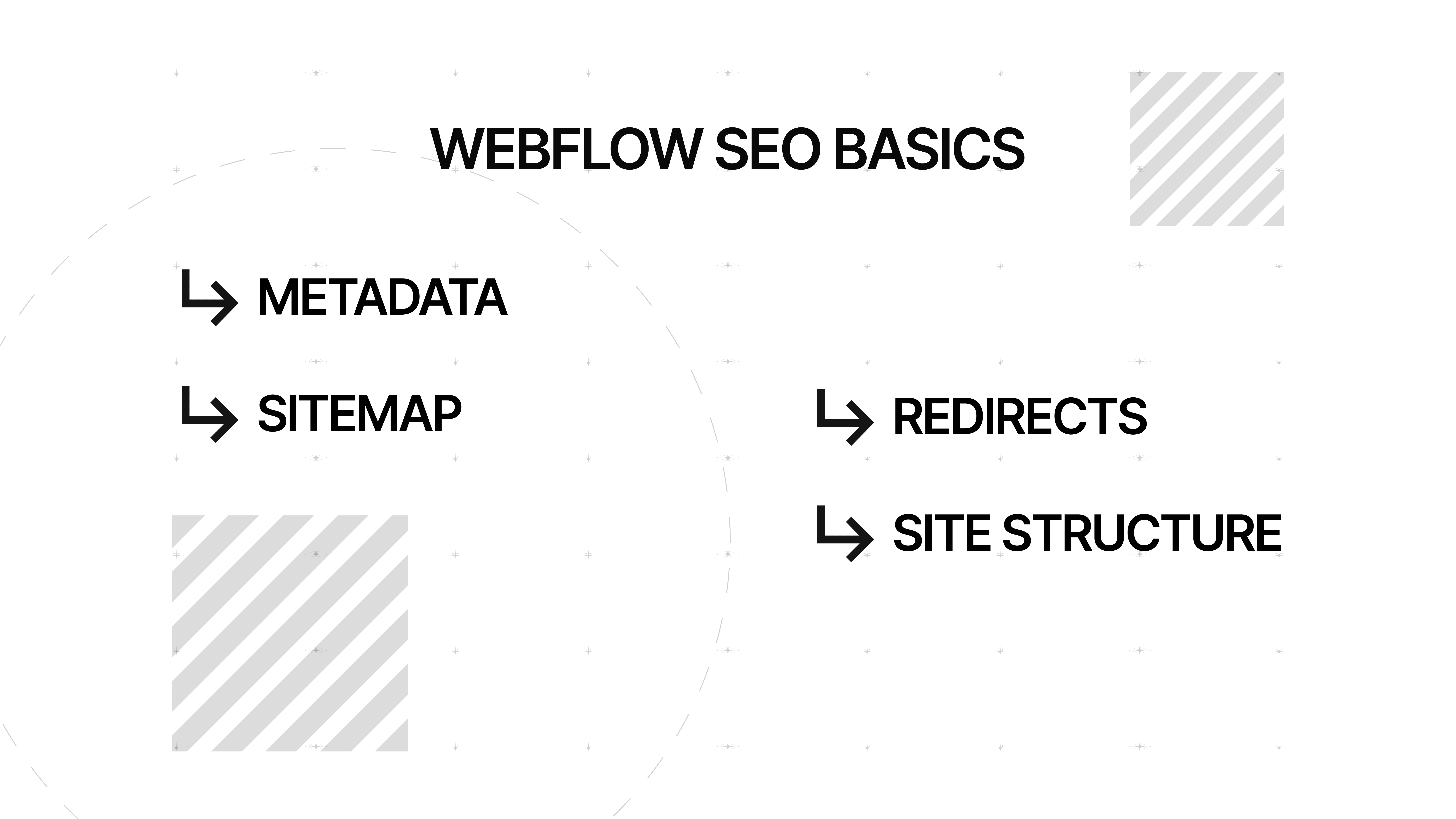
Yes, Webflow is good for SEO for most marketing sites, brand sites, hospitality websites, and content-driven businesses. It covers the core SEO controls most teams actually need, such as page titles, meta description fields, image alt text, custom URLs, 301 redirects, sitemap support, robots controls, SSL, and the ability to add schema markup when needed.
Here’s where things get interesting. Webflow is often a better SEO fit than people expect, especially for teams that care about design, speed, and publishing control, but it’s not magic and it’s not always the best choice for every edge case. If you need an enormous plugin ecosystem, highly specialized ecommerce SEO workflows, or deeply customized publishing logic, WordPress may still offer more flexibility through plugins like Yoast SEO and others.
Why Webflow performs well for SEO
A lot of Webflow’s SEO strength comes from control, not hacks. You can manage page-level metadata, adjust indexing rules, publish a sitemap, define redirects, and structure content visually without relying on a stack of third-party plugins just to get the basics right. For a lean marketing team, that’s a real advantage, because fewer moving parts usually means fewer things quietly breaking in the background.
Webflow hosting also helps on the technical side. Webflow says its hosting includes SSL certificates and global CDN delivery, both of which support a faster and more reliable experience, and Google explicitly recommends strong page experience signals, including good Core Web Vitals, as part of building successful search performance.
That doesn’t mean every Webflow site is automatically fast, of course. A bloated page with oversized media is still a bloated page, even if the platform is solid underneath it.
And this is where most businesses get it wrong. They blame the platform when the real issue is weak information architecture, thin content, bad internal linking, or a homepage trying to do the job of ten pages at once. Google’s own SEO guidance keeps coming back to the same theme: make content understandable, useful, and easy to crawl.
Webflow SEO features that matter
On-page SEO controls
Webflow lets you edit the meta title and meta description for pages, and that matters because Google uses several signals to generate title links and may use your meta description as the snippet when it helps users understand the page.
You don’t control exactly what Google shows, but you absolutely influence it, and clear metadata still improves your chances of a better search result presentation.
You can also add alt text to images, which helps both accessibility and SEO. Google recommends descriptive alt text and relevant surrounding content so search engines understand the subject of the image and how it connects to the page.
For hospitality brands, that means a room image should say what it is, not something vague like “image-4-final-final.” We’ve all seen that file naming crime scene before.
Technical SEO settings
Webflow automatically generates a sitemap when you host your site there, and Google recommends using sitemaps to help crawlers discover important URLs.
Webflow also gives you robots.txt controls, which is useful for directing crawler access, although Google is clear that robots.txt is not a tool for hiding pages from search by itself.
Redirect management is another big one, especially during redesigns or migrations. Webflow supports 301 redirects in site settings, which makes it easier to preserve link equity and avoid the classic “we launched the new site and traffic fell off a cliff” scenario.
That scenario is more common than people admit in client meetings.
Schema, localization, and analytics
Webflow supports adding schema markup, which can help search engines understand page context more clearly.
If you run a hotel, restaurant, or multi-location brand, structured data can be especially useful for clarifying entities, offers, locations, and page type, though it often requires more manual setup than plugin-driven systems.
For multi-language brands, Webflow also supports localized SEO settings and hreflang-related page relationships through its localization tools. That’s important because international SEO gets messy fast if canonical and language signals aren’t handled properly.
Webflow can also connect with Google Analytics, and you should absolutely pair that with Google Search Console. A good-looking site without measurement is still guesswork in a nice outfit.
[IMAGE]
Where Webflow has SEO limitations
Let’s be fair. Webflow doesn’t offer the same plugin ecosystem as WordPress, and that matters for teams that want out-of-the-box add-ons for advanced schema, automated internal linking, large-scale redirect workflows, or niche SEO operations.
WordPress users can choose from mature SEO plugins that bundle many of those functions into one place.
Webflow also takes more time when you want very custom technical SEO implementations. That’s not because Webflow is weak, but because it often expects a more deliberate setup.
In practice, that can be a good thing for teams who want cleaner control, and a bad thing for teams hoping a plugin will solve strategy for them. It won’t, by the way. No plugin has ever fixed a bland page with no search intent behind it. That remains a stubbornly human problem.
Another limitation is scale in unusual cases. If you’re managing a massive editorial operation, highly complex faceted navigation, or very advanced ecommerce SEO logic, a different stack may give you more flexibility.
For most brand sites, service sites, hospitality websites, and well-structured content hubs, though, Webflow’s SEO capabilities are more than enough when the fundamentals are handled properly.
Webflow vs WordPress for SEO
The simplest comparison is this: WordPress usually wins on extensibility, while Webflow often wins on built-in control and cleaner publishing workflows.
WordPress gives SEO experts a huge plugin market, including Yoast SEO and other tools for schema, local SEO, redirects, audits, and content guidance.
Webflow gives you a more controlled environment where many essential SEO settings are already built into the product.
That distinction matters for founders and operators. If your team wants a design-forward website builder with strong SEO controls and fewer dependency headaches, use Webflow.
If your team has a highly technical content operation and wants endless plugin customization, WordPress may be the better fit.
Neither platform guarantees better search engine rankings on its own. The winner is usually the team with the better structure, content model, and execution.
How to optimize a Webflow site for better SEO
Start with the boring stuff, because boring stuff pays rent.
Write a clear meta title and meta description for every important page, create descriptive URLs, use one strong H1, add alt text where images carry meaning, and make sure your internal links are crawlable and descriptive.
These are basic SEO fundamentals, but they still do a surprising amount of heavy lifting.
Then move into site structure. Use Webflow CMS collections carefully, create dedicated pages for real search intents, and avoid stuffing key information into tabs, sliders, or vague blocks with no semantic hierarchy.
Search engines understand clear content architecture much better than design theater. Your homepage can be beautiful, but your service pages still need to explain what you do, where you do it, and why someone should care.
Next, pay attention to technical SEO and performance. Submit your sitemap in Search Console, review indexing rules, check canonicals where duplication may happen, and run PageSpeed Insights so you can spot performance issues before they turn into ranking or conversion problems.
Good Webflow SEO is not just publishing. It’s maintenance.
A simple Webflow SEO checklist
- Write unique SEO titles and descriptions
- Add alt text to meaningful images
- Set up 301 redirects before launch
- Publish and submit your sitemap
- Review robots and indexing settings
- Add schema where context matters
- Connect Google Analytics and Search Console
- Test performance with PageSpeed Insights
- Build internal links between related pages
- Update content regularly based on real search demand
Webflow SEO for hospitality brands, creative teams, and founders
If you run a hospitality brand, local SEO and content clarity matter more than clever motion design.
Your pages should make location, offering, amenities, booking intent, and brand positioning obvious to both visitors and search engines.
Webflow can help here because it lets teams build highly visual experiences without giving up important SEO controls.
For creative teams, Webflow makes it easier to protect brand presentation while still supporting on-page SEO best practices.
That balance matters. A site can be visually ambitious and still be technically understandable, but only if the design system respects hierarchy, copy structure, and page intent.
Otherwise, you get a gorgeous experience that ranks like a locked filing cabinet.
For founders and operators, the real value is speed of execution. Webflow makes it easy to ship landing pages, update content, refine metadata, and collaborate without waiting on a heavy development queue for every change.
That won’t replace SEO strategy, but it does make SEO efforts easier to maintain over time.
[IMAGE]
Final verdict: Should you use Webflow for SEO?
If your goal is better SEO on a modern brand site, Webflow is a strong choice.
It gives you the controls needed to help search engines understand your content, improve user experience, manage technical settings, and build pages that can rank higher in search engine results when the strategy is sound.
But there’s a catch.
Webflow for SEO works best when the team behind it understands search intent, content architecture, and ongoing optimization.
In other words, Webflow is a powerful SEO builder, not a substitute for thinking. Honestly, that’s probably a good thing.

FAQs
Is Webflow good for SEO compared with other website builders?
Yes, Webflow is competitive with other major website builder options because it includes strong built-in SEO controls like metadata, redirects, sitemap support, robots controls, SSL, and schema support. The best platform still depends on your team’s workflow and the complexity of your site. (Webflow Help Center)
Can a Webflow website rank on Google?
Absolutely. Google ranks pages based on usefulness, crawlability, clarity, and overall page experience, not because a site used one platform or another. A well-structured Webflow website can rank if the content deserves to rank. (Google for Developers)
Does Webflow include built-in SEO tools?
Yes. Webflow includes built-in SEO features such as page-level meta fields, sitemap generation, robots.txt settings, redirect controls, and support for schema markup. That covers most of the essentials many businesses need. (Webflow Help Center)
Is Webflow better than WordPress for SEO?
Not universally. Webflow often feels cleaner and simpler for teams that want native SEO controls, while WordPress can be more flexible because of its plugin ecosystem, including tools like Yoast SEO. The better choice depends on how much customization your SEO workflow requires. (WordPress.org)
Does Webflow help with local SEO?
It can. Webflow gives you the structure to create strong location pages, add relevant metadata, use schema markup, and manage localized SEO settings, all of which support local visibility when paired with strong business information and content. (Webflow Help Center)
What’s the biggest SEO mistake people make in Webflow?
Usually, it’s assuming the platform is the strategy. The most common problems are weak page targeting, thin copy, poor internal linking, and ignoring performance or indexing details after launch. Webflow makes optimization possible, but it still needs direction and maintenance. (Google for Developers)
Migrate from Squarespace to Webflow? Guide & Expert Review
Migrate from Squarespace to Webflow? Guide & Expert Review
Visual Storytelling in Your Sales Funnel
Unleash visual storytelling in the sales funnel! Craft a compelling video marketing strategy. Learn how storytelling in sales drives conversions.

Four minutes to the best marketing in Florence
What can a sandwich in Florence teach us about branding and hospitality marketing? A story of hype, human connection, and what brings guests back.

Share this Blog Article on Social Media
See you
at 8:00.
Laptop optional.
Swimsuit recommended.
Excuses not accepted.
Let’s innovate together!